top of page


全体レイアウト
Overall Layout

Snowの大脳:AIユニット
Snow' Cerebrum: AI Unit
①充電
Charging
USB Type-C充電ポートにケーブルを接続し、AIユニットを充電してください。 Snowが元気におしゃべりできるよう、十分に充電してからご使用ください(30分間に超えないように)。
Connect a USB-C cable to the charging port and charge the AI module.
Make sure Snow is fully charged so it can stay active and chat with you (don't charge over 30 minutes).
②電源オン
Power On
AIユニットの電源スイッチを「トーク/休憩モード切替ボタン」側へスライドすると、Snowが目を覚まします(電源ON)。
反対側へスライドすると、Snowがおやすみモードに入り、電源がOFFになります。
Slide the AI unit power switch toward the talk / standby button to wake Snow up (Power ON).
Slide it in the opposite direction to let Snow rest and turn the power OFF.
③初回Wi-Fi接続
First-Time Wi-Fi Setup
Snowが「Wifi設定モードに入りました」と音声で案内するまでお待ちください。
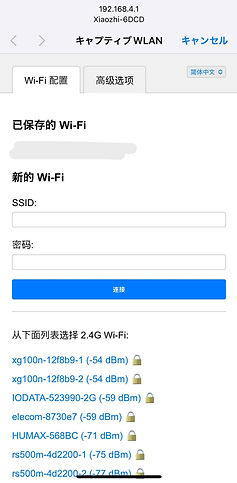
スマートフォンのWi-Fi設定を開き、 「Xiaozhi」という名前を含むWi-Fiネットワークを選択して接続してください。
接続後、自動的に設定ページが表示されます。
表示されたページの一覧から、お家のWi-Fi(2.4GHz)を選択し、パスワードを入力してください。
設定が完了すると、Snowが該当Wi-Fiに自動的に接続できます。
Wait until Snow announces: "Entering Wi-Fi setup mode."
Open the Wi-Fi settings on your smartphone and look for a network containing the name "Xiaozhi".
Connect to it and wait for the setup page to appear automatically.
From the list, select your home 2.4GHz Wi-Fi network and enter the Wi-Fi password. Once completed, Snow will connect to your Wi-Fi network.
お家では2.4GHz Wi-Fiがない場合:
別のスマートフォンでテザリング(モバイルホットスポット/アクセスポイント)を有効にし、
そのネットワークを選択してください。
スマートフォンのテザリングを利用することで、Snowを連れて外出する際にもインターネット接続が可能です。
If you do not have a 2.4GHz Wi-Fi network:
You can enable a mobile hotspot on another smartphone and select that network instead. Using a mobile hotspot also allows Snow to stay connected while accompanying you outside the home.

ご自宅で使用する場合
Using Snow at Home
電源を入れた後、Snowの起動音(ポコ音)が鳴るまでお待ちください。
起動後、「トーク/休憩モード切替ボタン」を押すと聞き取り状態になり、会話を開始できます。
長時間会話しない場合、自動的に待機状態へ移行することがあります。
その場合は再度「トーク/休憩モード切替ボタン」を押して聞き取りを開始してください。
Snowが話している最中に
ボタンを1回押すと発話を中断します。
もう一度押すと待機状態に戻ります。
Snowが聞き取り中に
ボタンを押すと待機状態に戻ります。
After turning on the power, wait until Snow plays the startup bubble sound.
Press the Talk / Standby Button to activate listening mode and begin a conversation.
If Snow remains inactive for a long period, it may automatically enter standby mode.
In that case, press the Talk / Standby Button again to resume listening.
While Snow is speaking:
Press once to interrupt the speech.
Press again to return Snow to standby mode.
While Snow is listening:
Press once to return Snow to standby mode.
外出先で使用する場合
Using Snow Outdoors
スマートフォンのテザリング(モバイルホットスポット/アクセスポイント)は未接続時に自動中断の場合がありるため、テザリングでSnowを使用する際は、
1、先にスマートフォンのテザリング(モバイルホットスポット/アクセスポイント)をONにする
2、すぐにSnowのAIユニットの電源をONにするという順番で操作してください。
Snowの起動音(ポコ音)が聞こえたら、「トーク/休憩モード切替ボタン」を押して会話を開始できます。
「Wi-Fi設定モードに入りました」と音声が流れた場合は、ネットワーク接続はできてないため、
再度操作してください。
Mobile hotspots may automatically enter sleep mode when no device is connected.
When using Snow with a smartphone hotspot:
1, Turn on the hotspot first.
2, Immediately switch on Snow's AI Unit.
Once Snow's startup bubble sound is heard, press the Talk / Standby Button to start a conversation.
If Snow announces: "Entering Wi-Fi Setup Mode", the network connection was not established successfully. Please repeat the setup process.
Snowの小脳:モーションユニット
Snow's Cerebellum:Motion Unit
電池の取り付け:
Installing the Battery:
Snowの胸元のファスナーを開けると、お腹のポケットが見えます。
図の向きに従って9V電池を取り付けてください。
※ご注意:電極の向きを正しく合わせてください。
Open the zipper on Snow's chest to access the battery compartment.
Insert the 9V battery according to the orientation shown in the diagram.
Important: Make sure the battery terminals are aligned correctly.
手順:
Steps:
1, 9V電池を正しい向きで黒い電池ケースに入れます。
2, 電池の端子と電池ケースの端子を合わせます。
3, 電池の上部を指で押し、端子をしっかりとはめ込みます。
1, Place the 9V battery into the black battery holder in the correct orientation.
2, Align the battery terminals with the holder terminals.
3, Press downward on the top of the battery until it clicks securely into place.


①手を振る
Waving
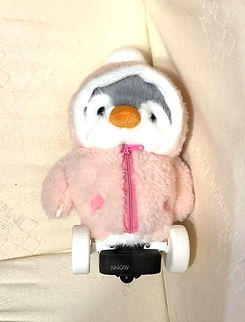
モーションスイッチをONにすると、手振り動作が始まります。
Snowは一定のリズムで手を振り、バッテリー残量が少ないことを知らせます。
Turn on the Motion Switch to activate the waving motion.
Snow will wave at a fixed interval to indicate that the battery level is running low.
②走行
Moving
走行スイッチをONにすると、自動走行を開始します。
障害物回避機能を搭載していますが、カーペットなどの凹凸のある床面での使用は避けてください。
Turn on the Movement Switch to activate autonomous movement.
Snow is equipped with obstacle avoidance functionality.
However, avoid operating on uneven surfaces such as carpets or rugs.
その他の製品
Other Products
画家 Kagura Mizu 直筆手描きアートバッグ
Hand-Painted Art Bags by Artist Kagura Mizu
世界初、名画をバッグに描いたアート作品。
時空を超える物語『真珠の耳飾りの美術先生』にも登場するアートバッグです。
量産品では決して表現できない、世界にひとつだけの存在感が、
あなたらしい個性をより美しく輝かせます。
世界にひとつしかない、日常をアートへと変える特別な作品です。
The world's first art bags featuring famous masterpieces
painted directly onto the bag itself.
These unique art bags also appear in the time-travel story
The Art Teacher with a Pearl Earring.
Each piece carries a one-of-a-kind presence that mass-produced products can never replicate, allowing your individuality to shine.
A truly unique artwork that transforms everyday life into art.


AIロボットペンギンSnow
AI Penguin Robot Snow
ドラマ『真珠の耳飾りの美術先生』に登場する、
未来からやってきた癒やしのパートナー。
最先端のAI技術を搭載したロボットペンギンSnowは、
仕事に疲れたあなたに笑顔を届けます。
ジョークを話して楽しませてくれるだけでなく、一緒に愚痴をこぼしたり、
苦手な相手への不満を聞いてくれたりもします。
さらに、職場で自分の利益を守る方法や、
交渉のコツについてアドバイスをしてくれることもあります。
あなたの日常に、まるで陽だまりのような温かな彩りを届けます。
A gentle companion from the future,
featured in the animated story The Art Teacher with a Pearl Earring.
Powered by cutting-edge AI technology,
Snow brings smiles when you're tired from work and everyday life.
Snow can tell jokes, listen to your complaints,
and even join you in venting about frustrating people.
When needed, Snow can also offer practical advice on protecting your interests
at work, navigating workplace relationships, and handling negotiations.
Bringing warmth and comfort to your daily life
—just like a ray of sunshine.


© Gallery Hanamurasaki. All rights reserved.
bottom of page